Sunday, October 4, 2026

Sunday, October 4, 2026
* All product/brand names, logos, and trademarks are property of their respective owners.
Pre-fab building has come a long way from the temporary homes of the 1940s. Modern modular units are well insulated, carefully engineered, and built to tight tolerances in a factory. Yet the way many of them are sold and specified still relies on brochures, PDFs and a handful of artist impressions.
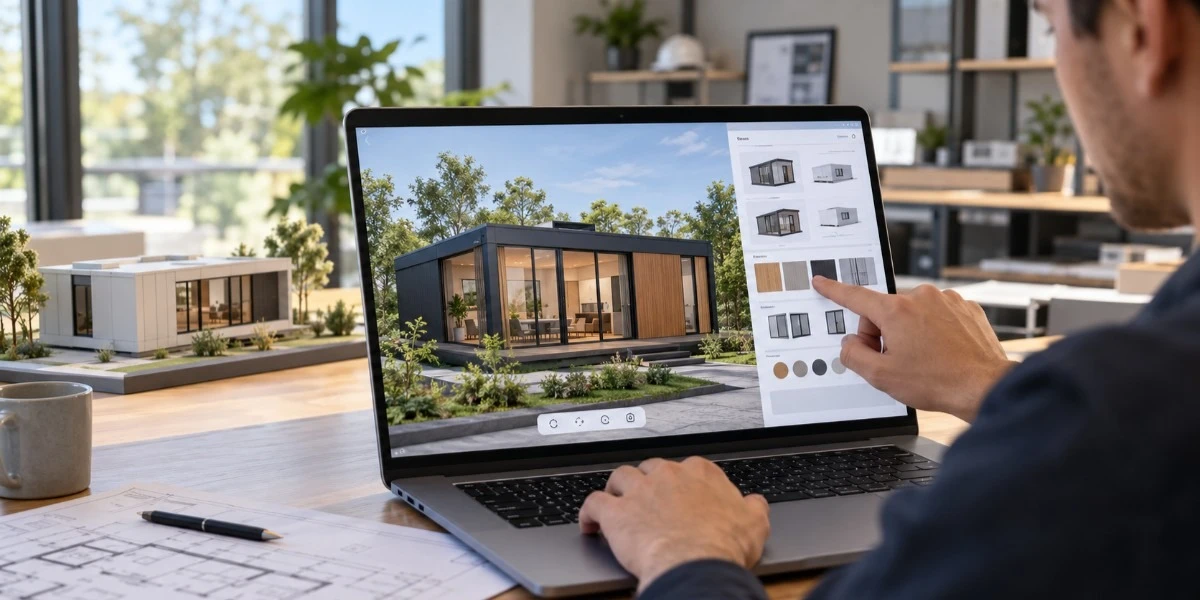
A 3D product configurator changes that. Instead of asking a client to imagine a finished structure from a floor plan, it lets them open a model, change it, and see the result straight away. This article looks at how that works for pre-fab structures, where it saves time and money, and what to check before adopting one.
Pre-fab has a long history in Britain. After the Second World War, more than 150,000 prefab homes were built across the country to ease a severe housing shortage. They were quick to put up, but nobody would have called them flexible.
Today's modular buildings are a different thing. Offices, classrooms, garden rooms, site cabins and homes all come out of factories with a wide range of layouts, cladding, glazing and finishes. That range is the selling point. It is also the problem. A buyer faced with dozens of options and a flat drawing will either freeze or guess.
Guessing gets expensive. A change made on screen costs almost nothing. The same change after production starts can cost a great deal.
A 3D product configurator is an interactive tool that shows a product as a live 3D model and lets the user change its features. Pick a different roof style and the model updates. Swap the cladding, move a door or add a window, and the structure redraws in seconds.
Behind the screen sits a set of rules. The configurator knows which combinations can be built, which cannot, and what each choice does to the specification. The buyer explores freely, but only inside what the factory can actually deliver.
That last point matters. A polished render can promise something that cannot be made. A well-built configurator cannot, because the production rules are part of the tool.
Plans and elevations are written for engineers. Most clients do not read them fluently. 3D visualisation fixes this by showing the building as it would look on a real plot.
For pre-fab structure visualisation, the gains show up quickly:
Static renders do some of this. The real difference is interaction. A render shows one option, chosen by someone else. A configurator shows whichever option the viewer wants to see.
Customisation sounds great until every client asks for something unusual. Then the factory receives bespoke orders that slow the whole line down.
Good 3D customisation works differently. It offers choice within a structured range: sizes, layouts, materials, colours, door and window positions, and fit-out packages. Everything on the menu is something production can deliver.
Take a modular classroom. A school could compare a single-room layout with a two-room one, try cladding that suits its existing buildings, and check how a different window arrangement looks from inside. The decision gets made in one meeting, not across six rounds of revised drawings.
Not every tool is equal. A few questions save trouble later:
One caution is worth stating plainly. A configurator shows what a building will look like. It does not approve it. Any pre-fab structure in the UK still has to meet building regulations, and planning permission may be needed depending on size and location. Treat the tool as part of the process, not a way around it.
Configurators are becoming less of a standalone widget and more of a front end for the whole sales and design process. Some already let a client view a model on their own plot through a phone camera. Linking choices to pricing, stock, and production schedules is the logical next step.
For pre-fab, that fit is natural. The whole point of factory building is repeatable, controlled quality. An interactive design tool gives that strength a clear and honest shop window.
Pre-fab structures succeed when the design is settled early and built accurately. A 3D product configurator supports both. It gets clients into the design at the start, cuts misunderstanding, and keeps customisation inside what can be built.
The practical way in is to start small. Choose one product line, offer a manageable set of options, and build in the real production rules. Once that works, the range can grow.

The term Acamento has attracted growing attention online, particularly in articles discussing finish
24 September 2026
In today's fast-paced business and event industry, Audio Visual Services play a vital role in creati
30 July 2026
Artificial intelligence has transformed the way people create content. From writing blog posts and e
20 July 2026
Be the first to share your thoughts
No comments yet. Be the first to comment!
Share your thoughts and join the discussion below.